Streaming Engine to 5k+ Users (3) - Debugging Leaked Goroutine with Websocket

Test Goal
The real show begin. Let's do the spike test with 1500 VUs and see what will be happened.
Conclusion
I spotted a lot of goroutine leaked. I fixed it. The system can now handle 1500 VUs without any issues.
This is the most time consuming part of the load test.
If you are interested in the debugging process, please continue reading.
Spike Test Round
export const options = {
  stages: [
    { duration: '3m', target: 1000 },  // Ramp-up: from 0
    { duration: '1m', target: 1000 },  // Steady state: observe baseline
    { duration: '30s', target: 1500 }, // Spike: Sudden influx of concurrent users
    { duration: '1m', target: 1500 },  // Sustained peak: test Lock Contention
    { duration: '10s', target: 0 },    // Recovery: Rapid scale down
  ],
};
Observations
BC11: Streaming Engine with Session Management and Redis Pub/Sub Fan-out Architecture BC15: API Gateway with WebSocket Connection Management
Gateway Memory was leaking ❌
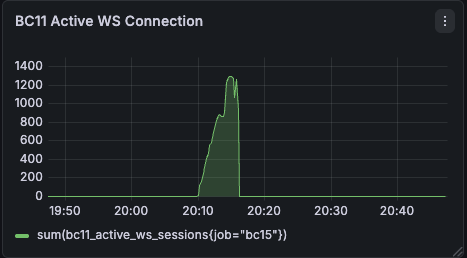
BC11 Active WS Connection should be BC15 Active WS Connection
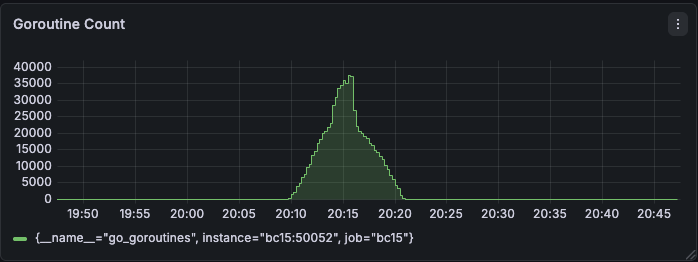
It was wired having 35000-40000 goroutine with only 1300 WS connections during the peak.
Fan-out arch is successful ✅
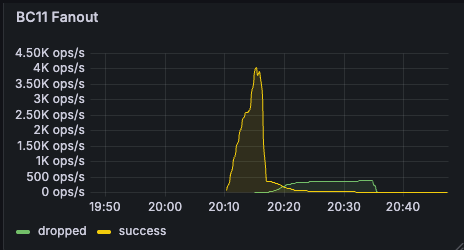
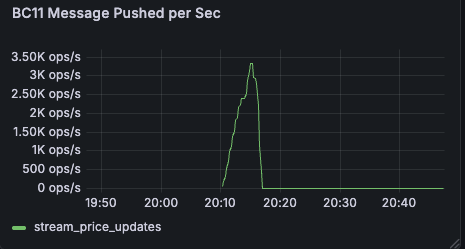
Message successful rate was met around 4.5k ops/s, while drop rate is almost zero, together with message pushed rate. It means inside BC11 no message is blocked during the test.
Hardware limit is far from reached ✅
Service's CPU didn't meet limit
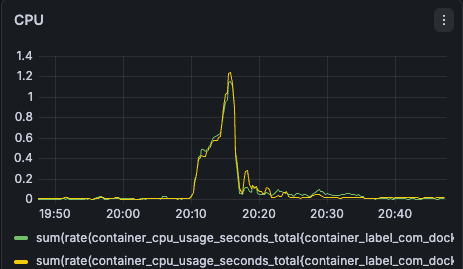
According to the graph, CPUs are almost idle (CPU reach 1.3 core * 2 = 2.6 / 8 cores) and it usually indicates that our system is meeting I/O blocking or Deadlock.
Redis didn't have load pressure ✅
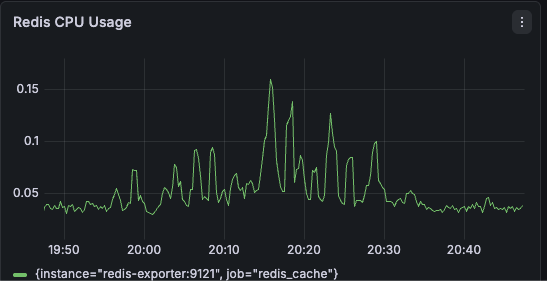
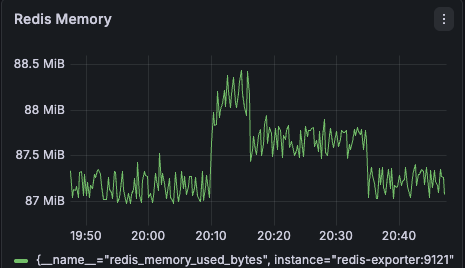
Based on the graph, I can confirm that I successfully shifted pressure to service from redis by fan-out arch through a one-ticker-one-connection architecture.
Redis PubSub Connection was leaking ✅
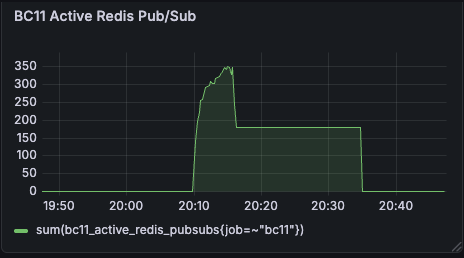
The Redis PubSub connection number is back to baseline.
Debugging
I thought the issues may be related to the low level network or wrong configuration. So I tried to by pass Docker Desktop Proxy and increase all the congfiguration limits that I could find to see if it can resolve the issue.
By pass Docker Desktop Proxy
In case port proxy is a bottleneck when docker desktop forward inside docker desktop. I created a new temporary K6 container firing test inside of docker desktop to bypass the possible proxy issue.
  k6:
    image: grafana/k6:latest
    labels:
      - "load-test"
    volumes:
      # load local script
      - ./k6/:/scripts
    networks:
      - lzstock-network
    profiles:
      - tools
docker compose -p load-test run --rm k6 run /scripts/load-test.js
gRPC MaxConcurrentStreams
I also increased the MaxConcurrentStreams to 65535 to prevent connection drop.
g.ServerInstance = grpc.NewServer(
  ...
  grpc.MaxConcurrentStreams(65535),
)
TCP Backlog
Linux's TCP connection may be jammed. To prevent connection drop, this value is needed.
bc11:
  sysctls:
    - net.core.somaxconn=65535
File Descriptor Limit / ulimit
In Linux, each Websocket Connection is a TCP Socket, and each socket needs a File Descriptor. In case of disruption of connection, I updated the upper limit.
bc11:
  ulimits:
    nproc: 65535
    nofile:
      soft: 65535
      hard: 65535
Root Cause Analysis with pprof
Everything mentioned above didn't resolve the issue. So I started to analyze the pprof results.
go tool pprof http://localhost:50052/debug/pprof/goroutine
go tool pprof -http=:8082 pprof.app.goroutine.pb.BC15-0.gz
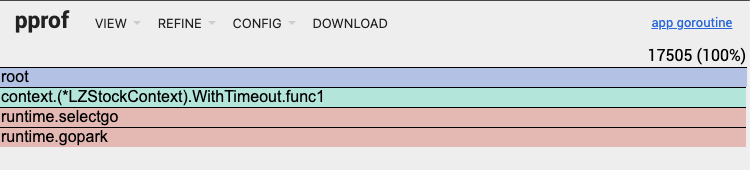
At the top right of the pprof screenshot, it shows unexpected high value of goroutine which was 17505 (100%). The runtime.gopark means the Goroutine is putting to sleep because it is waiting on a select statement. The custom withTimeout function is the reason that cuased the leak. A anaymous background Goroutine (func1) wasn't canceled cleanly. So it got stuck waiting forever.
Solution
failed to cancel websocket connection
First attempt
The implicit cancel call is inside WithTimeout(). It is fine if it is for HTTP connection, but not quite good for websocket, which relies on explicit cancel call to prevent leaked goroutine.
HTTP connection is upgraded to a long live state after websocket connection. So it is necessary to close connection manually instead of fully relying on Done() method in the framework.
Fasthttp reuse RequestCtx and put it back to sync.Pool. When it called upgrader.Upgrade(), this conneciton is over from Fasthttp's perspective. It will put the RequestCtx back to the pool. So the goroutine that is waiting on the ctx.Done() will be executed wrongly.
Original v.s. Fixed Code is this:
ctx := LZContext.New(routingCtx).WithTimeout(5 * time.Minute)
func (cb *LZStockContext) WithTimeout(timeout time.Duration) (context.Context){
  ...
  ctx, cancel := context.WithTimeout(context.Background(), timeout)
  ...
- go func() {
-   select {
-   case <-cb.routingCtx.RequestCtx.Done():
-     cancel() // cancel when HTTP request end
-   case <-ctx.Done():
-     return
-   }
- }()
  ...
- return ctx
+ return ctx, cancel
}
In the upper layer or the caller level. A caller should be responsible for canceling the context.
- ctx := LZContext.New(routingCtx).WithTimeout(5 * time.Minute)
+ ctx, cancel := LZContext.New(routingCtx).WithTimeout(5 * time.Minute)
+ defer cancel()
Second attempt
In both handleGRPCStream() and listenWebSocketMessages(), I put select + default and called two blocked action in default case. I set read deadline to 15 minutes in listenWebSocketMessages(), and called stream.Recv() in handleGRPCStream(). Either of them will be blocked if the context Done() was called.
So, I removed select + default and listened to context Done() in the upper layer and call conn.Close() if the context was done. So the connection will be closed explicitly when the context was done.
Original v.s. Fixed Code is this:
func handleGRPCStream(ctx context.Context, conn *websocket.Conn, req *pb.StreamPriceUpdatesReq, sessionID, investorID string) error {
  ...
  for {
-   select {
-   case <-ctx.Done():
-     return ctx.Err()
-   default:
      stock, err := stream.Recv()
      if err != nil {
        if err == io.EOF {
          return nil // 正常結束
        }
        return fmt.Errorf("failed to receive from stream: %w", err)
      }

      if err := sendToWebSocket(conn, stock, sessionID, investorID); err != nil {
        return fmt.Errorf("failed to send to WebSocket: %w", err)
      }
    }
  }
}

func listenWebSocketMessages(ctx context.Context, conn *websocket.Conn, sessionID, investorID string) error {
  for {
-   select {
-   case <-ctx.Done():
-     return ctx.Err()
-   default:
      // Set read timeout
      conn.SetReadDeadline(time.Now().Add(15 * time.Minute))

      messageType, message, err := conn.ReadMessage()
      if err != nil {
        if websocket.IsUnexpectedCloseError(err, websocket.CloseGoingAway, websocket.CloseAbnormalClosure) {
          return fmt.Errorf("WebSocket read error: %w", err)
        }
        return fmt.Errorf("WebSocket connection closed: %w", err)
      }

      // Handle received messages
      if messageType == websocket.TextMessage {
        if err := handleWebSocketMessage(conn, message, sessionID, investorID); err != nil {
          log.Printf("Error handling WebSocket message: %v", err)
          continue
        }
      }
    }
  }
}

func PricePusher(conn *websocket.Conn, routingCtx *routing.Context, err *error) {
  g, ctx := errgroup.WithContext(ctx)
+ go func() {
+   <-ctx.Done()
+   if conn != nil {
+     conn.Close()
+   }
+ }()

  // Handle gRPC stream
  g.Go(func() error {
    return handleGRPCStream(ctx, conn, req, sessionID, investorID)
  })

  // Monitor WebSocket connection
  g.Go(func() error {
    return monitorWebSocketConnection(ctx, conn, sessionID, investorID)
  })

  // Listen WebSocket messages
  g.Go(func() error {
    return listenWebSocketMessages(conn, sessionID, investorID)
  })
}
Third attempt
After K6 test finished, it will abruptly stop the test. It may not dispatchs TCP FIN packet to the server. So the server may not be able to close the connection gracefully. To address this issue, the server should actively check the connection status by sending a ping message periodically. If the client side didn't respond within 60 seconds with a pong message, the server will close the connection.
const (
	pingPeriod = 30 * time.Second
	pongWait   = 60 * time.Second
)
func monitorWebSocketConnection(ctx context.Context, conn *websocket.Conn, sessionID, investorID string) error {
  ...
+ ticker := time.NewTicker(pingPeriod)
  ...
}
func listenWebSocketMessages(conn *websocket.Conn, sessionID, investorID string) error {
  // Set up initial read deadline
+ conn.SetReadDeadline(time.Now().Add(pongWait))
+ conn.SetPongHandler(func(string) error {
+  // Extended read deadline to 60 seconds as long as the client side responds with a pong message.
+   conn.SetReadDeadline(time.Now().Add(pongWait))
+   return nil
+ })

  for {
-   // Don't set read deadline in the loop.
-   conn.SetReadDeadline(time.Now().Add(15 * time.Minute))
  }
}
func handleWebSocketMessage(conn *websocket.Conn, message []byte, sessionID, investorID string) error {
  var wsMsg WSMessage
  switch wsMsg.Type {
    case "ping":
      // Add extended read deadline to 60 seconds as long as the client side sends with a ping message.
+     conn.SetReadDeadline(time.Now().Add(pongWait))
      ...
  }
}
Result
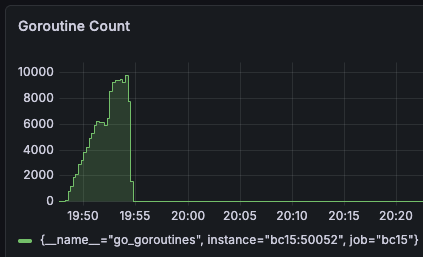
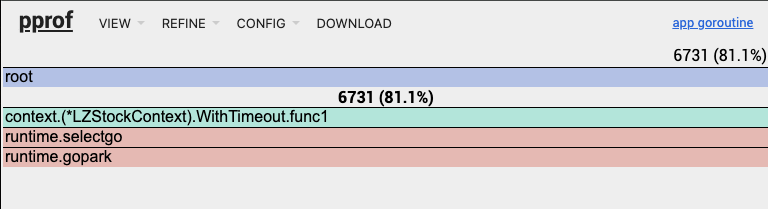
Gateway Memory was not leaking anymore ✅
In comparison with the previous goroutine count, it was reduced from 35000-40000 to 1000-2000.
Verified with K6 Result
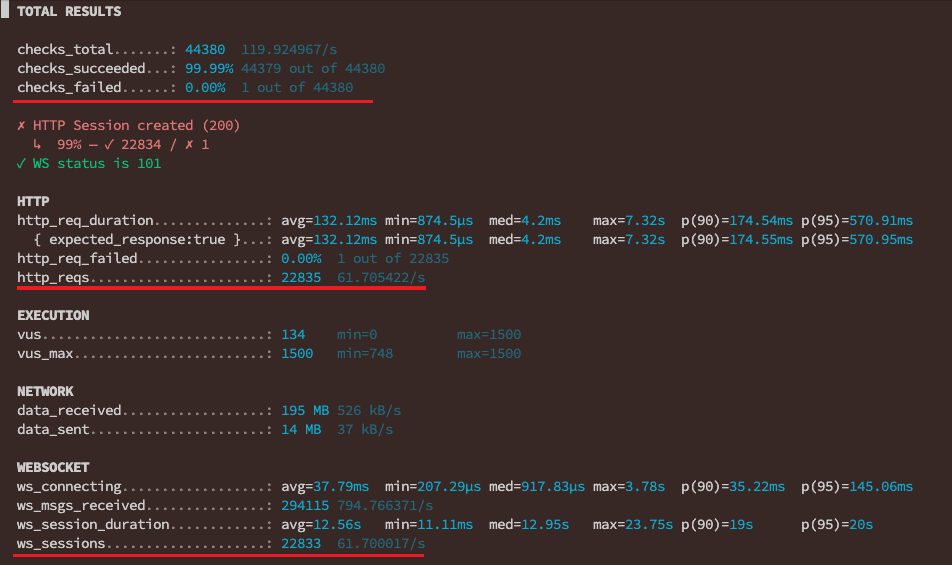
There was 46 errors out of 22833 WS connections and 46 errors out of 22835 Websocket connections. So the availability was 99.8%.
# 46 Error / 22833 WS connection
ERRO[0172] [VU 259] WS Error:  websocket: close 1006 (abnormal closure): unexpected EOF  source=console
...
There were 46 errors out of 22835 HTTP connections. So the availability was 99.8%.
# 46 Error / 22835 HTTP connection
ERRO[0362] [VU 1496] HTTP Failed! Status: 0, Body: null  source=console
...
ERRO[0369] [VU 428] HTTP Failed! Status: 0, Body: null   source=console
What is Status: 0, Body: null?
It happened near the end of loading test. Status: 0, Body: null means no TCP connection, the request didn't even touch the server.
Only one error was caused by 404 error. It can be ignored during these kind of high load test.
# 1 / 22835 HTTP connection
ERRO[0275] [VU 743] HTTP Failed! Status: 404, Body: Route not found  source=console
Now the spike test is successful. Let's shift to capacity test in the next article. I will test 5000 users CCU within 5 mins and hold for another 5 mins. All of them will continuously receive message through websocket, of course.